
As an administrator, you manage user accounts for your financial education program. This includes adding other administrators who help manage the platform and advisors who drive awareness and adoption among learners.
You can add either role using the same workflow in the platform.
Step-by-Step: Add a New User
-
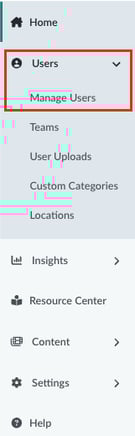
Navigate to Manage Users
From the left-hand navigation menu, click Users, then select Manage Users. -
Click Add New User
In the upper-right corner of the Manage Users page, click Add New User. -
Complete the User Details
In the pop-up window:- Enter the user’s email address.
- Select the appropriate user type: Advisor or Administrator.
- Fill in any additional required user details.
-
Click Create User
Once all fields are complete, click Create User. -
User Receives Welcome Email
The new user will receive a welcome email with a link to complete their registration and set up their account.
Role Overview
- Administrator: Has access to manage users, view analytics, and configure program settings.
- Advisor: Can invite learners to financial education content, track engagement, and support outreach efforts.
- Learn more about our different user roles: Roles And Permissions In Achieve
Need to know how to manage existing users? Learn here: