
The Elective Learning Activity Summary dashboard is your gateway to understanding how learners interact with your programs. As an admin, you’ll use this report to track participation, discover popular topics, and analyze traffic sources—all in one place. With intuitive filters and visualizations, you’ll quickly identify trends and opportunities to enhance your learners’ experience.
What You’ll Learn in This Article
- What the Elective Learning Activity Summary dashboard is and where to find it
- Who should use it and why it matters for admins
- Key benefits and use cases for your organization
- Overview of the main metrics and what they mean
- How to use the dashboard to answer common questions about your program’s performance
- Where to find more detailed information and advanced analysis
What Is the Elective Learning Activity Summary?
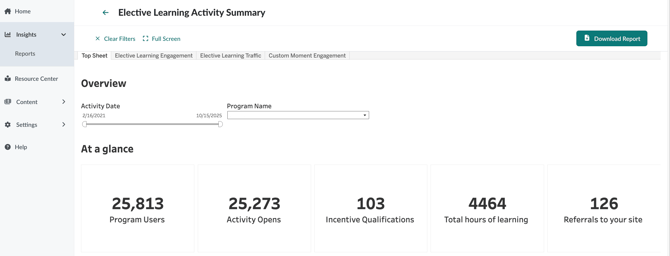
The Elective Learning Activity Summary is a reporting dashboard designed for program admins. It brings together essential data about learner engagement, content popularity, and traffic sources, so you can make informed decisions and maximize the impact of your learning initiatives.
Who Should Use This Dashboard?
If you’re responsible for managing, reporting on, or optimizing educational programs, this dashboard is for you. It’s especially valuable for admins who want to:
- Monitor engagement across multiple programs and playlists
- Identify which topics and activities are resonating with learners
- Understand how users are accessing content and which channels drive the most traffic
- Measure the effectiveness of marketing campaigns and outreach efforts
Key Benefits and Use Cases
- Track Participation: See how many users are engaging with your programs over time.
- Discover Popular Topics: Identify which playlists, modules, and activities are most viewed.
- Analyze Traffic Sources: Understand where your users are coming from—whether it’s direct visits, referrals, or marketing campaigns.
- Evaluate Performance: Use metrics like incentive qualifications and Custom Moment conversion rates to better understand content and campaign performance.
Main Metrics at a Glance
-
The Elective Learning Activity Summary includes several metrics to help you understand program activity and engagement, including:
- Program Users: Number of registered and guest users counted as visiting your program
- Activity Opens: Number of times users have loaded an activity
- Incentive Qualifications: Number of users who have qualified for an incentive by completing all required content in an incentivized playlist
- Total Hours of Learning: Total time users have spent learning
- Referrals to Your Site: Clicks generated from Custom Moments back to your website
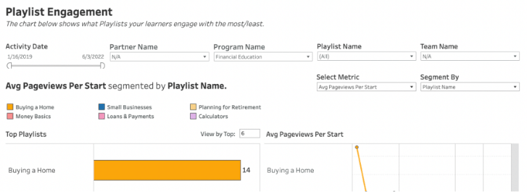
- Top Playlists and Modules: Your most popular playlists and content based on views and opens
-
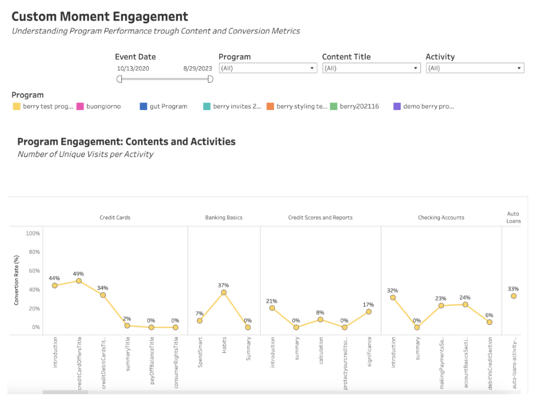
- Custom Moment Conversion: How your Custom Moments compare based on conversion rate.
-
- Traffic Sources: Where visitors to your program are coming from
- Playlist and Content Engagement: Additional insights into learner activity, users, time spent, and completions across your playlists and content
How to Use the Dashboard
With the Elective Learning Activity Summary, you can answer questions like:
- How many people are using my educational program, and how does usership vary over time?
- Which channels are most successful in driving traffic to my program?
- How engaged are my users, and which content is most or least viewed?
- How effective are my incentives in driving completion?
- How well is my program performing as a content marketing tool?
- Which Custom Moments generate the most clicks?
- Which playlists and modules are most popular and relevant?
Ready to Dive Deeper?
Explore the Elective Learning Summary: Topsheet for a quick snapshot of key metrics, or review the Elective Learning Activity Summary: Full Dashboard Metrics and Traffic Analysis for advanced insights and best practices.
Tip: Bookmark this article and share it with your team to ensure everyone is making the most of your reporting tools. The Elective Learning Activity Summary is designed to inspire data-driven decisions and continuous improvement.