
- Registration Questions
- Adding/Editing Registration Questions
- Attendee Registration Page
- Where can the Event Admin see the data?
- FAQs
Registration Questions
For organizations with the Event Management capability, Event Admins and Staff can enable registration questions for Attendees to answer on the day of the event during registration.
Adding/Editing Registration Questions
Registration questions can be enabled in the Event Wizard when creating a new event, or if the event has already been created, it can be added to an event on the Event Details page.
Event Wizard
|
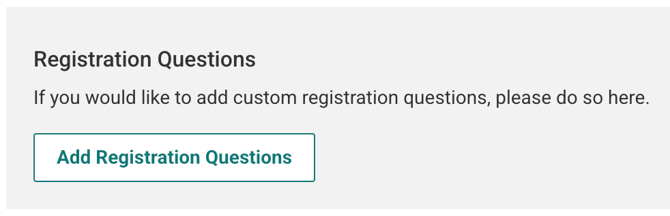
When creating a new event, on the second page of the event wizard you will now see the Registration Questions section. Click on Add Registration Questions. This will open the Registration Questions modal. |
|
|
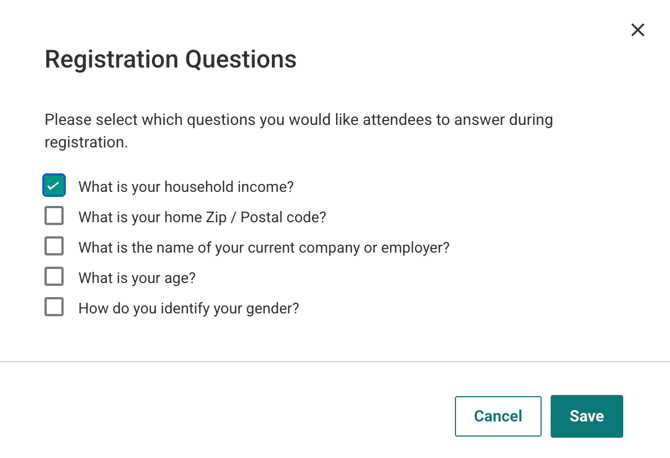
Select the questions you want to be visible, then click Save. |
|
|
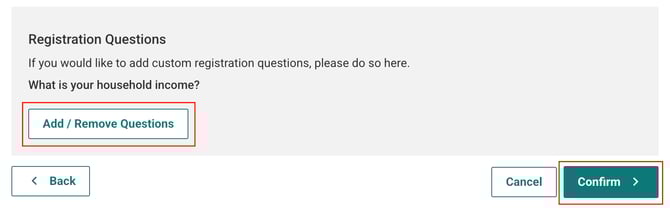
The selected questions should now be visible in the wizard. Click Add/Remove Questions to edit your choices. Click Confirm to finish making your event. |
|
Event Detail Page
If you’ve already created an event you can add or edit registration questions on the Event Detail page for that event. To get to the Event Detail page, click on Manage Events > Events, then locate and click on the specific Event you would like to edit. Click the Join Event button.
On the next page you will see a box containing Event information. Click on the green Edit button to edit any information. Be sure to click Save when you are done.
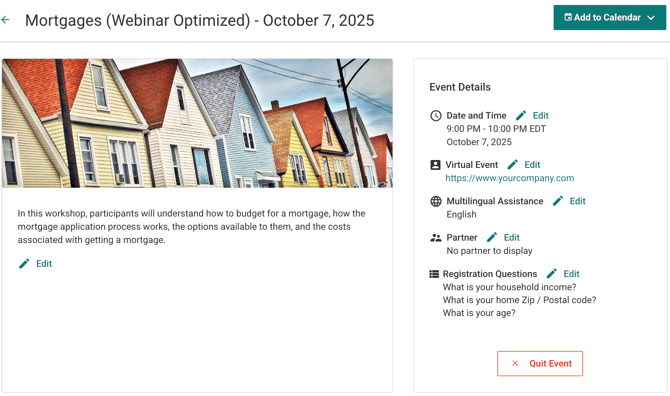
No longer want to join this event? From the Event Details page, click on Quit Event
Attendee Registration Page
On the day of the event, Attendees will see the registration questions once they have clicked Get Started on the Attendees Event Detail page. They are taken to the Registration Page where they will see the enabled questions at the bottom of the page. Any registration question that is enabled for an event is a required field, but it is possible to select Prefer not to answer or to type something unexpected in some fields.
Where can the Event Admin see the data?
Once an Attendee has registered, the answers to the registration questions can be seen by going to the Attendees page and downloading the report. Each question is in its own column.
FAQs
Q: Can an org edit the registration questions in any way?
A: No, all questions are static and are visible to all orgs. At this time the only customization is turning them on or off.