
What Is the Learner Response Analysis Dashboard?
The Learner Response Analysis Dashboard summarizes how learners respond to evaluation questions embedded in your Achieve programs. These questions may include:
- Polls
- Surveys
- Assessments
The dashboard aggregates responses to protect learner privacy and provides insights into how learners are engaging with your content and what they’re thinking or feeling about key financial topics.
This dashboard is available for programs delivered through Achieve’s Elective Learning LMS, which is called Foundry.
How to Access the Dashboard
- Log into Foundry.
- Navigate to Reports in the left-hand menu.
- Select Learner Response Analysis from the list of available dashboards.
If you don’t see this dashboard, reach out to your Customer Success Manager to confirm whether it’s enabled for your program.
Metric Definitions
- Activity Name: A list of modules within your program(s) that contain evaluation questions (polls, surveys, or assessments).
- Response Activity: A timeline view showing how many responses were submitted over time.
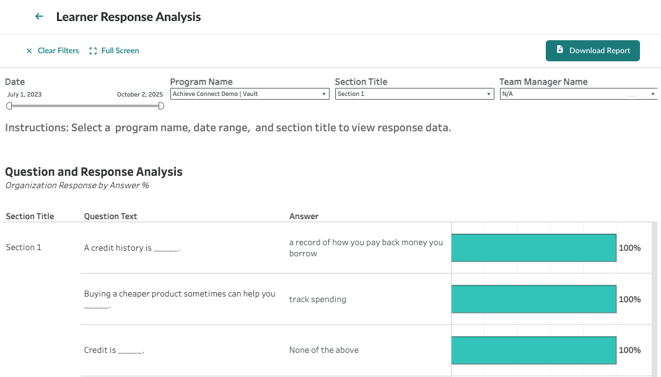
- Question and Response Analysis: A breakdown of how learners responded to each question, including the most and least selected answers.
Chart Descriptions
Response Activity
This chart displays the volume of evaluation responses over time. Use it to identify trends in learner engagement and pinpoint when learners are most active.
Question and Response Analysis
This chart shows how learners responded to individual questions. It helps you understand:
- Which questions are resonating with learners
- How learners are thinking about key financial topics
- Where there may be knowledge gaps or misconceptions
Use Cases for Achieve Partners
- Program Evaluation: Use response data to assess how well your content is meeting learner needs.
- Advisor Insights: While advisors don’t see individual learner responses, admins can use this data to inform advisor training or outreach strategies.
- Content Optimization: Identify which questions or topics may need clarification or additional support based on learner responses.
- Reporting: Include response trends in quarterly business reviews (QBRs) or internal impact reports.
Privacy Considerations
All data in this dashboard is presented in aggregate to protect learner privacy. Individual responses are not visible, and no personally identifiable information (PII) is included.
Related Dashboards
- Personalized Learning Dashboard: View how learners engage with personalized playlists based on diagnostic responses.
- User Report: See individual learner progress and completion data.
- Activity Summary: Track overall engagement across modules and playlists.