
Once you're done creating events, the Event Page is where administrators and facilitators can make any edits to the events, find materials to prepare for a workshop, and launch a workshop the day of the event. This article outlines the steps we recommend a facilitator takes to prepare for a successful workshop.
Before the Event
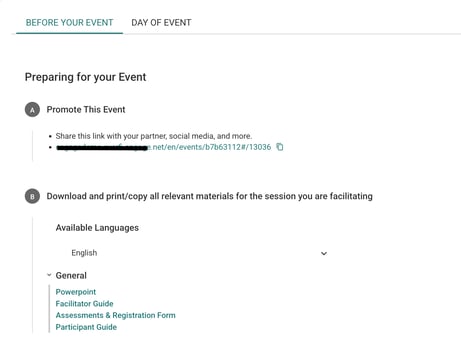
1. Once on the Event Page, scroll to the bottom to see 2 tabs: Before Your Event and Day of Event
2. Click Before Your Event to view the checklist
3. Promote This Event: This is where you can find the public event URL. Use this link in your promotions and share with partners, on social media, and more.
4. Download and Print/Copy Relevant Materials for the Session: Each topic has helpful materials for facilitators to make the most of the event. Download or print these resources before the event:
- Powerpoint
- Facilitator Guide
- Participant Guide
5. Access to the Online Workshop Content: The purpose of the Workshop Dashboard is for facilitators to see what attendees have access to. We do not recommend using this URL to promote. Instead use the URL under Promote This Event section. Facilitators can also access the Participant Guide and assessment questions in this view.
6. Pre-Registration List: Administrators and facilitators can toggle on or off the option to allow pre-registration for the event. Any attendees who register before the event will be listed here with their Name, Email, and Promotional Consent. This list is useful if facilitators need or want to communicate any information to attendees before the event. This list can be downloaded locally as a .CSV file.
Day of the Event
1. Once on the Event Page, scroll to the bottom to see 2 tabs: Before Your Event and Day of Event
2. Click Day of Event to view the checklist
3. Register Attendees: Depending on what the Event Type, the registration options will be different
- Option 1 (In-person Events only): Have attendees register on a shared device
- Option 2: Share the following link so attendees can register on their own devices
- Option 3: Display the QR Code so attendees can register on their own devices
4. Document Attendees: This is where you can find a list of all registrants and attendees after the event is over. If any registration information was collected separately, you can manually add attendee information. This includes any demographic questions you selected for the event.
5. Document Event Info: This section is used more for tracking purposes for each individual institution.
- Event (number of hours)
- Other (number of hours)
- Expenses (dollar amount)
- Notes