
What Is Social Sharing? How Does It Work?
Social sharing enables learners to easily share courses, playlists, or modules with their friends and family. This feature helps others start their financial journey and increases the reach of your program.
- Learners can share a playlist or module directly from the program interface.
- Social media icons (such as Facebook, Twitter, LinkedIn, and email) are displayed, allowing users to post links to their chosen platform.
- Shared links include your program’s logo or image, a title, and a description—making the content inviting and easy to understand.
Customizing Social Sharing Content
When setting up social sharing for your program, you can customize the following elements for each playlist or module:
-
Logo or Image:
- Use a JPEG or PNG file.
- Recommended size: 1200 x 630 pixels.
- Aspect ratio: 1.91:1, with the main focus centered.
-
Title:
- Shown when sharing playlist links on social media.
- Maximum 50 characters.
-
Description:
- Shown when sharing playlist links on social media.
- Maximum 300 characters.
-
Preview Example:
- When a learner shares a playlist, the link preview will display your chosen image, title, and description, making it clear and appealing for others to click and explore.
Where Social Sharing Appears
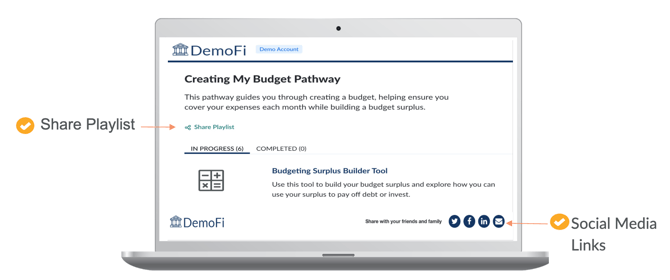
- Social sharing options are visible on playlist and module pages.
- Icons for Facebook, Twitter, LinkedIn, and email are typically shown together.
- Learners simply click an icon to share the content on their preferred platform.
Best Practices
- Choose images that represent your brand and the content of the playlist or module.
- Write clear, concise titles and descriptions that encourage others to learn more.
- Test your shared links to ensure the preview displays correctly on each platform.
Why Use Social Sharing?
- Makes it easy for learners to invite others to join your program.
- Helps spread financial education to a wider audience.
- Reinforces your institution’s brand and mission.
If you need help setting up social sharing or want to customize your images, titles, or descriptions, reach out to your Customer Success Manager.