
The Program Details tab provides a centralized view of the content and configuration for each Achieve program. It’s designed to help administrators and team members understand what learners will experience and how to manage program delivery effectively.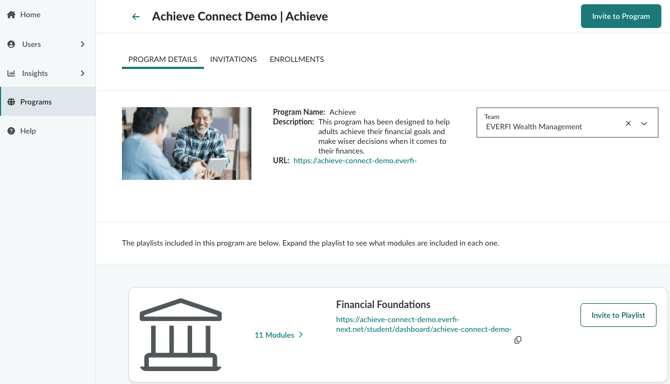
What You’ll See
On this tab, you’ll find:
- Playlists and Modules Summary: A clear breakdown of all playlists and their associated modules included in the program. This helps you verify the learning journey and ensure alignment with your organization’s goals.
- Preview URLs: Each playlist and module includes a preview link that shows how the content will appear to learners. These links are especially useful for reviewing content before sending invitations or embedding modules on external sites.
Team-Specific Views
In the Teams dropdown (located in the top-right corner), you’ll see all the teams you’re a member of. This dropdown is more than just a filter—it determines how the content is displayed and which URLs are generated:
- Team Context: When you select a team, all preview URLs update to reflect that team’s branding and configuration. This ensures that any shared links or invitations are tailored to the correct audience.
- Send Invite Pre-Population: The selected team also pre-populates the Send Invite page with relevant details, streamlining the invitation process and reducing manual entry.
If you belong to multiple teams, switching between them will dynamically update the page to reflect each team’s unique setup.
Best Practices
- Always confirm your selected team before sending invites or sharing preview links to ensure the correct branding and content configuration.
- Use preview URLs to validate the learner experience and confirm that playlists and modules are displaying as expected.
- Coordinate with your team to align on which playlists are active and which modules are prioritized for your audience.
Related Features
- For more advanced program setup, including custom playlists and registration options, refer to the Achieve user guide or explore the Creating Custom Playlists articles.
- If you’re using Achieve Connect, note that team-based invitations and advisor roles add additional layers of customization and tracking. These features are managed separately and may affect how URLs and reporting behave.