
Overview
The Reporting Center gives you on-demand access to data about learner activity, content engagement, responses, and program performance. Use these reports to identify patterns, explore how learners engage with your program, and make informed decisions about your education and engagement strategies.
Note: The information available in your reports may vary based on how your Achieve program is configured, including its registration and authentication settings.
Accessing the Reporting Center
First-Time User
You’ll receive an automated email from automated-message@everfi-foundry.net with a link to create your password. Select Click here to get started in the email to set your password and log in for the first time.
If you haven't received the email, request access from your Implementation Manager or Everfi Customer Support. An administrator account will be created using your organization email address.
Returning User
Log in using the URL provided by Everfi.
If you forget your password, select Forgot Password? on the login page. You’ll receive an email with instructions to reset it.
Navigating to the Reporting Center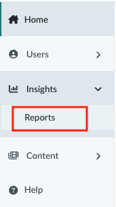
From Foundry, select Insights, then Reports to open the Reporting Center.
You may also see Your Top Reports on the Foundry home page. From there, you can open a report directly or select View All Reports to access the Reporting Center.
Available Reports
The reports available to you may vary based on your Achieve program and configuration.
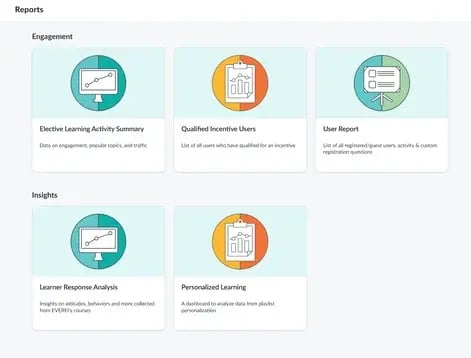
- Elective Learning Activity Summary: Explore program activity and engagement, including content performance, traffic, incentives, and Custom Moments.
- User Report: Review individual user activity, registration information, engagement, and custom registration responses.
- Qualified Incentive Users: Identify users who qualified for an incentive by completing the required content in an incentivized playlist.
- Learner Response Analysis: Explore aggregate responses to evaluation questions included in Achieve content.
- Personalized Learning: For programs with Personalized Playlists enabled, review learner responses associated with personalized learning experiences.
Need Help?
If you’re having trouble accessing the Reporting Center or a report isn’t displaying as expected, contact Everfi Customer Support.
Note: Reporting data updates every 24 hours (UTC time zone).