
Overview
The Reporting Center gives you on-demand access to data that helps you measure and improve your financial education program. You can track user engagement, content usage, and learning outcomes—all in one place.
Everfi believes that impactful education should be data-driven and results-focused. Use the Reporting Center to review data regularly and make informed decisions that strengthen your program.
Accessing the Reporting Center
First-Time User
You’ll receive an automated email from automated-message@everfi-foundry.net with a link to create your password. Click “Click here to get started” in the email to set your password and log in for the first time.
If you haven't received this email, request access from your Implementation Manager or from Everfi Customer Support. An administrator account will be created using your organization email address.
Returning User
Log in using the URL provided by Everfi.
If you forget your password, click “Forgot Password?” on the login page. You’ll receive an email with instructions to reset it.
Navigating the Reporting Center
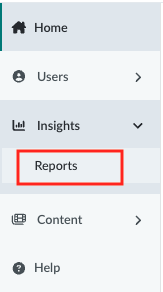
Use the navigation bar on the left side of your screen to explore dashboards and reports.
- Home: View commonly used reports and helpful resources.
- Reports: Browse available report types and select one to learn more.
Available Reports
Each report helps you understand different aspects of learner activity and program performance. Click on the Report Name to learn more about each report.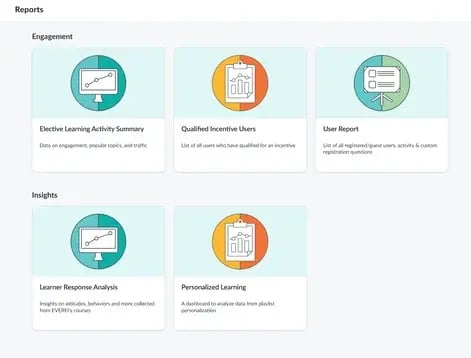
| Report Name | What It Shows |
|---|---|
| Elective Learning Activity Summary | Engagement with elective content, including custom moments. |
| User Report | Registration, progress, and custom question responses. |
| Qualified Incentive Users | Users who completed playlists tied to incentive campaigns. |
| Learner Response Analysis | Learner feedback and survey results. |
| Personalized Learning | Progress through personalized content. |
Troubleshooting Tips
If your reports or dashboards aren’t loading:
- Refresh the page.
- Click the link again.
- Clear your browser cookies.
- Still need help? Contact our Support team.
Note: Reporting data updates every 24 hours (UTC time zone).